How to get the most out of Black Friday & Cyber Monday in 2025
Insights
October 13, 2025
Anna Shevchenko
Black Friday & Cyber Monday is right around the corner. Time to set up your stores to crush this holiday season's sales!
Last year the Zapiet team created a guide of our new features to lead you through all useful tips and help you get ready for the festivities. Since each year brings something new to the table, this one isn’t an exception! We have updated our guide to help Shopify merchants double their results from the last year.
Grab a fresh coffee and take a few minutes out to read through our guide below. We will teach you how to use the most important features of Zapiet – Pickup + Delivery for a successful Black Friday & Cyber Monday.
1. Display the real-time stock level
If you offer in-store pickup and local delivery, we recommend enabling our integration with Shopify’s multi-location inventory feature.
This will prevent your customers from selecting a location for pickup that does not have the required items in stock.
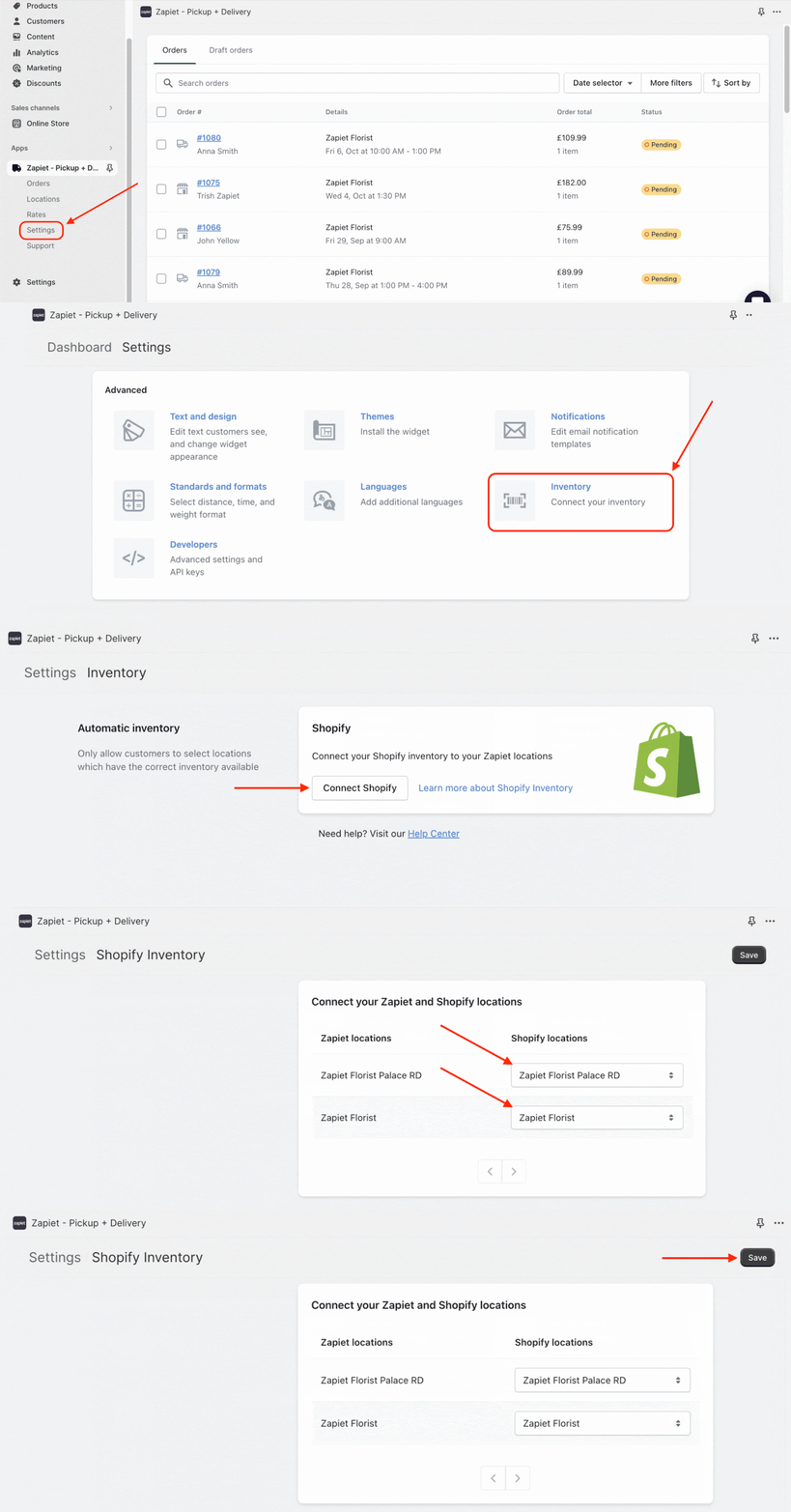
It’s super easy to enable by following the steps below:
- Open Zapiet – Pickup + Delivery.
- Click the Settings tab.
- Choose Inventory.
- Click Connect to Shopify.
- Connect your Zapiet – Pickup + Delivery locations to your Shopify locations.
- Click Save.
shopify.com
Note: Depending on the size of your product catalogue it can take up to an hour for your initial inventory data to synchronize.
Check out the Inventory Help Article to learn how to use this feature.
2. Set up product availability for pickup and delivery locations
If you have prepared certain products which are likely to have a high demand in specific stores, you can enable a product availability feature for pickup and delivery locations.
You can control the product availability by either offering: all products; specific products; all products in a specific collection; all products with a specific tag; specific product types; or products by a specific vendor.
For example, you have some products from last year's collection which go with an extra discount and are available in several locations. You can filter product availability to let your customers choose the location where they can either pick up the order or opt for the local delivery method.
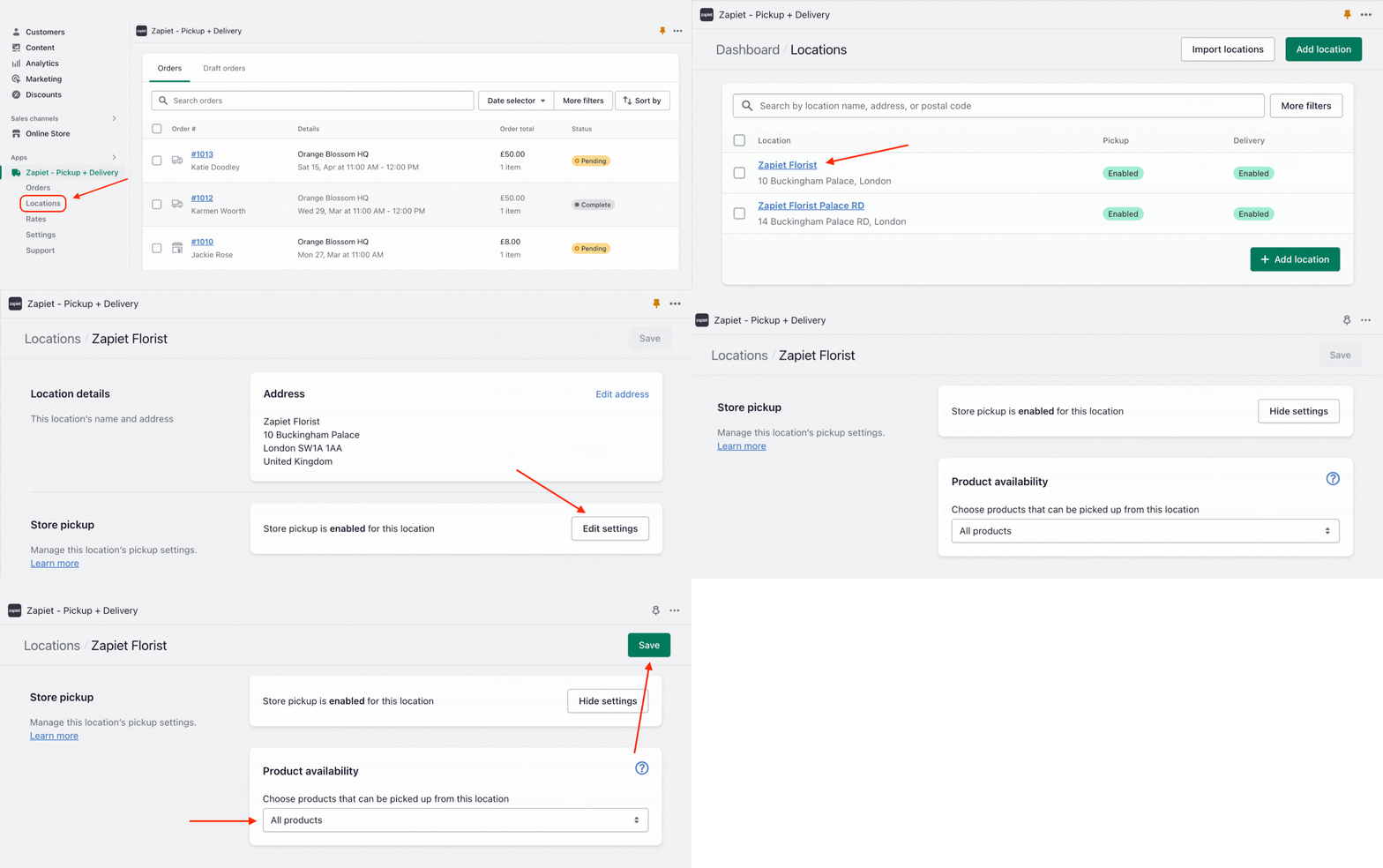
Follow these steps to set up product availability:
1. In Zapiet - Pickup + Delivery, click Locations.
2. Select the location you want to edit.
3. In the Store Pickup/Local Delivery section, click Edit settings.
4. Go to the Product availability section.
5. Set up product availability according to your business needs.
Read our Pickup product availability and Delivery product availability articles to set up this feature.
3. Increase your preparation times
Black Friday & Cyber Monday deals encourage customers to buy more, which results in higher order volumes. So, our next tip is to increase preparation times for your store to allow more time to get orders ready during high-intensity days.
Imagine, you run an electronics store and instead of an average of 5 orders per day, you’re getting 100. By increasing your preparation time from 1 day to 2-3 days, you get the extra capacity to prepare and beautifully pack your orders without disappointing customers or compromising quality control.
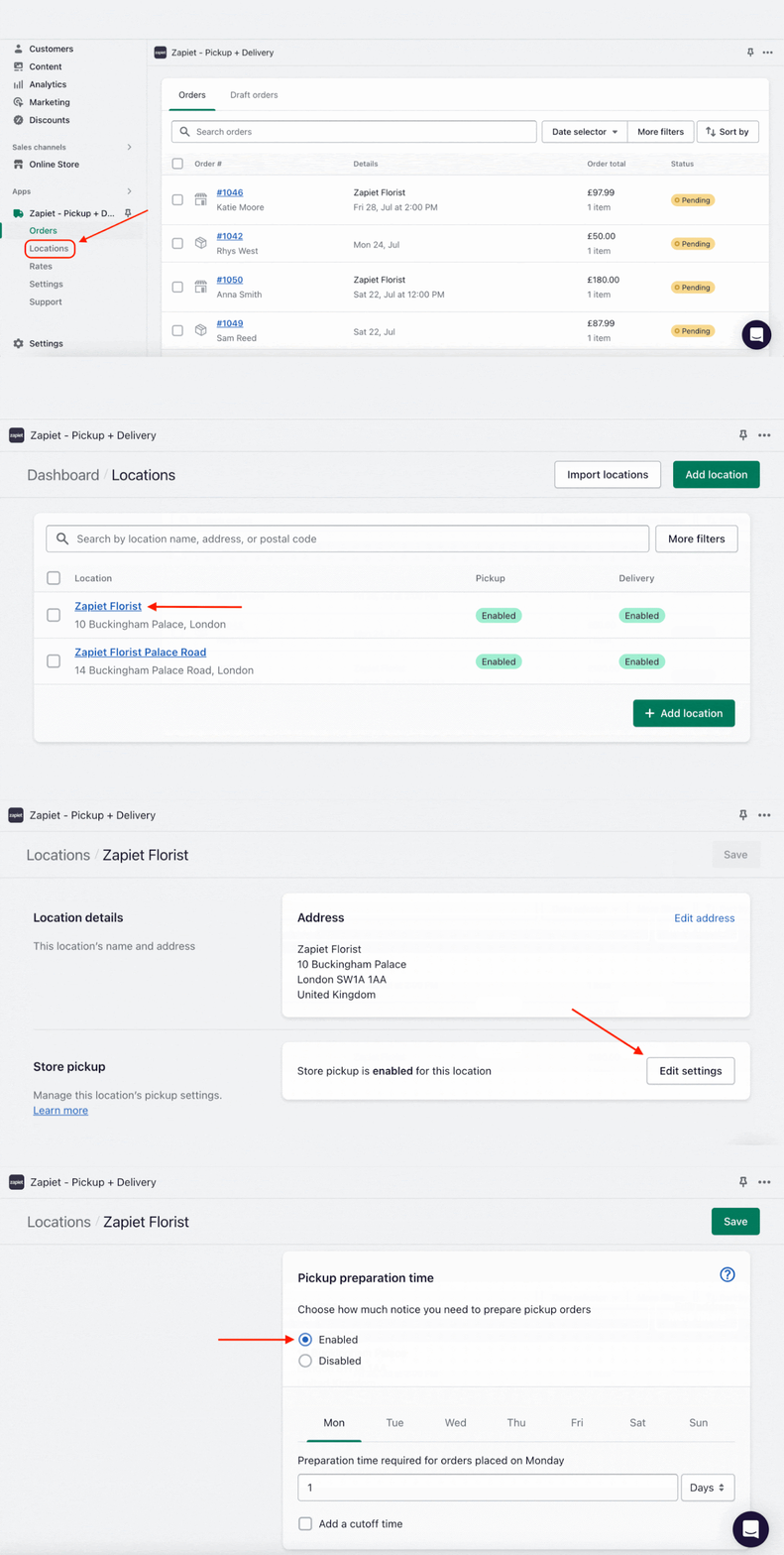
You can easily increase preparation times for your pickups and local deliveries:
- Open Zapiet – Pickup + Delivery.
- Click the Locations tab.
- Choose the Location Name.
- Go to Store Pickup/Local Delivery and click Edit settings
- Find the Preparation time section and click Enabled.
- Set the necessary preparation time which can vary for different days of the week.
Read Store pickup preparation time and Local delivery preparation time in our Help Center for more information.
You can also use product-specific preparation time for products that require a different preparation time than others.
Check out our Help Article to quickly enable this feature!
4. Enable order limits
During the BFCM boom, it is important to objectively assess your team's capability to prevent being overwhelmed with too many orders. For this, we recommend limiting the number of orders per day or per time slot.
For example, you run an accessory store, offering both in-store pickup and local delivery options, with an average number of 10 orders per day. When getting ready for BFCM, you make predictions based on past year stats, expecting sales to increase by 3 times. You configure the schedule and put all efforts into successfully managing the order flow, enabling Zapiet – Pickup + Delivery order limits according to your store capacity.
By limiting the number of orders per day, you can avoid over-commitment and ensure all orders are ready to be picked up and deliveries are on time to the customers.
Follow these easy steps to enable order limits:
- Open Zapiet – Pickup + Delivery.
- Click the Locations tab.
- Click the location name you would like to add the limits to.
- Click Edit settings in the Store Pickup sections.
- Find the Order limits section for Pickup.
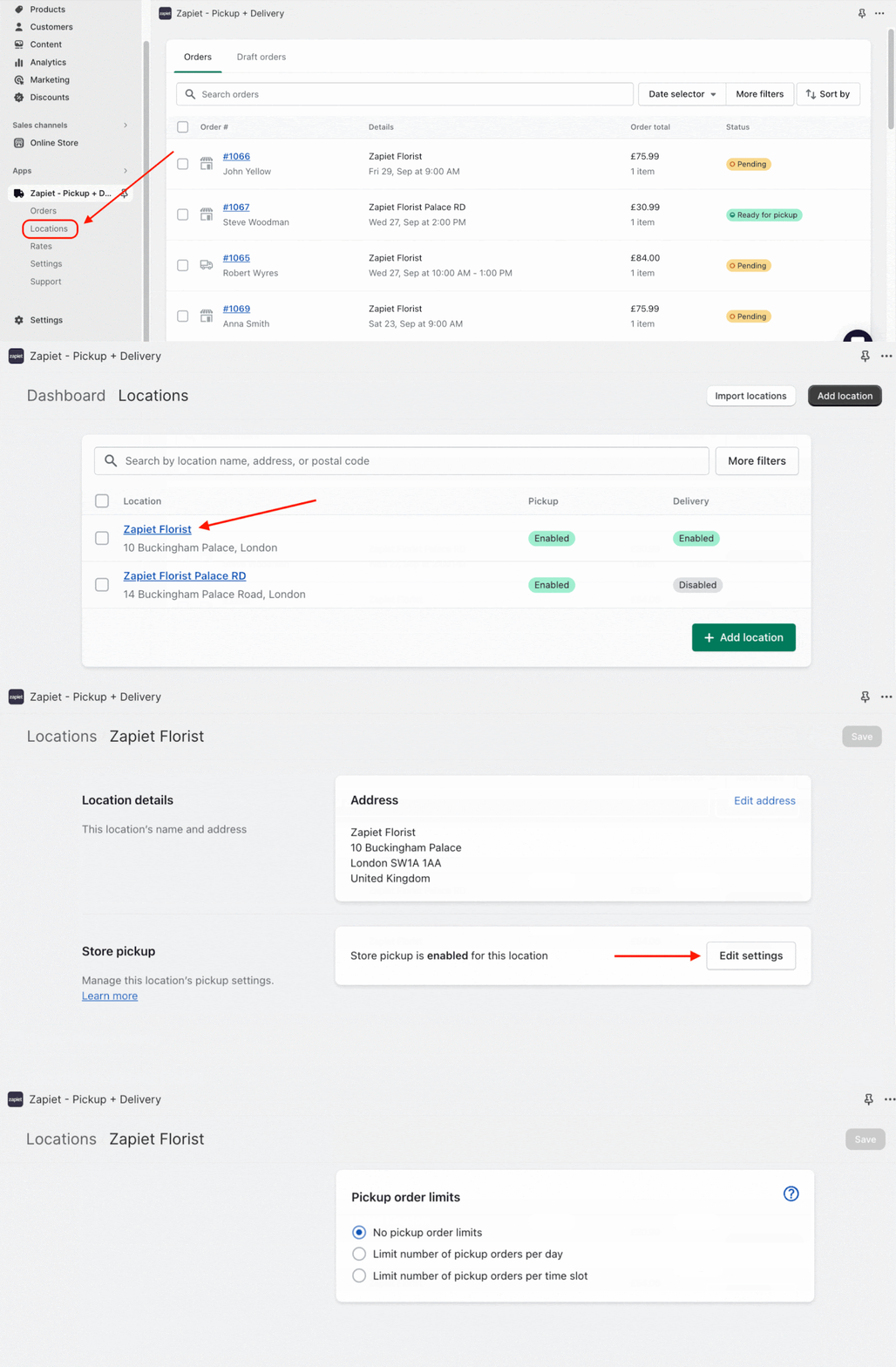
To limit the number of Pickup orders per day or time slot, make sure the date and time picker are enabled.
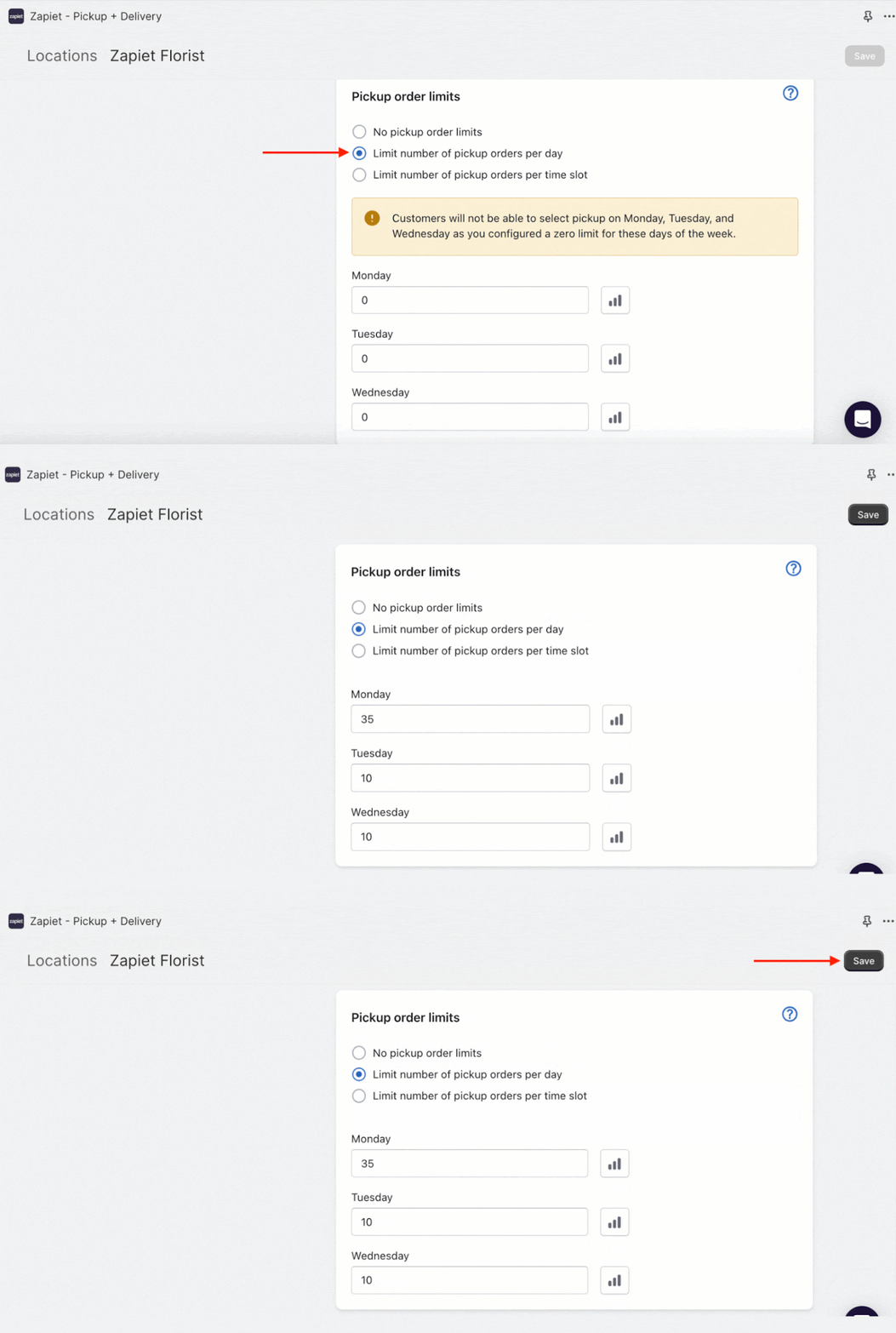
To set up the order limits per day:
- Under Pickup order limits, select Limit number of pickup orders per day. Maximum order numbers will be set to 0 by default.
- Add the maximum number of orders you want to receive for each day
- Click Save.
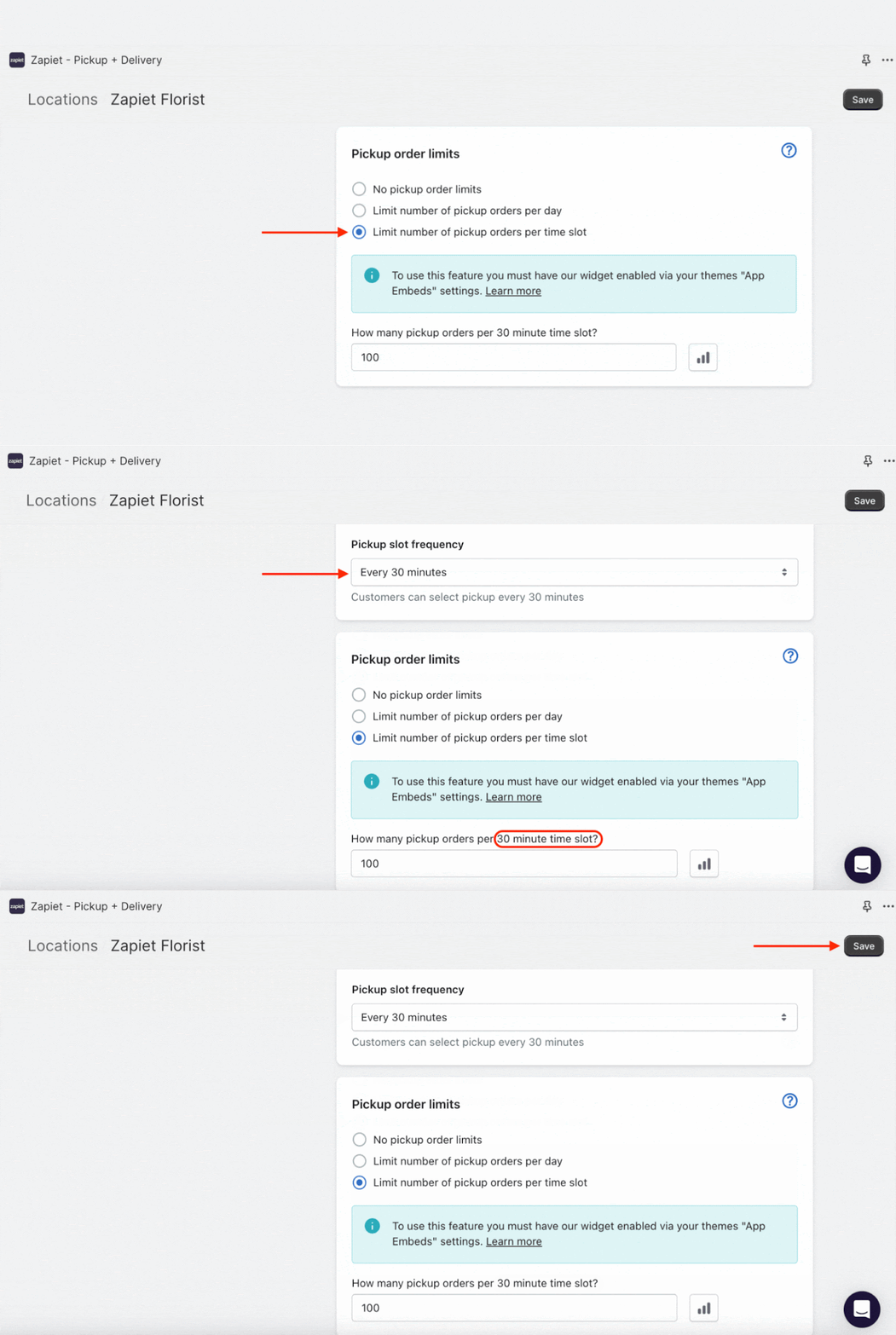
To set up the order limits per time slot:
- In Pickup order limits section, select Limit number of pickup orders per time slot.
- Add the maximum number of pickup orders you want to receive per slot.
- Click Save.
You can limit Delivery orders per day and time slot as well. Check out our tutorials on Pickup order limits & Delivery order limits to quickly enable these features.
5. Enable your seasonal products during festivities
If you want to allow or restrict certain products for pickup, delivery or shipping during special dates of the year, we recommend using our Product Date Restriction feature.
This will help you set only specific days for your seasonal products to be available to order.
Imagine you own a restaurant and are getting ready for Black Friday, Cyber Monday and the preceding Thanksgiving. For this special occasion, you offer turkey, a seasonal product which isn’t available year-round. The product date restriction feature will let you customize the desired days the dish will be available for pickup and local delivery.
Easily set product date restrictions for both pickup and delivery orders:
- Open Zapiet – Pickup + Delivery.
- Click Locations and select the location you'd like to add a restriction to.
- Click Edit settings under the Store pickup/Local delivery section.
- In the Product date restrictions section and click Add product date restriction.
- Select the product you'd like to restrict and click Add.
- Allow or disable pickup/delivery on selected dates.
- Select a date and click +Add date.
- When finished, click Done.
- Press Save to keep new settings.
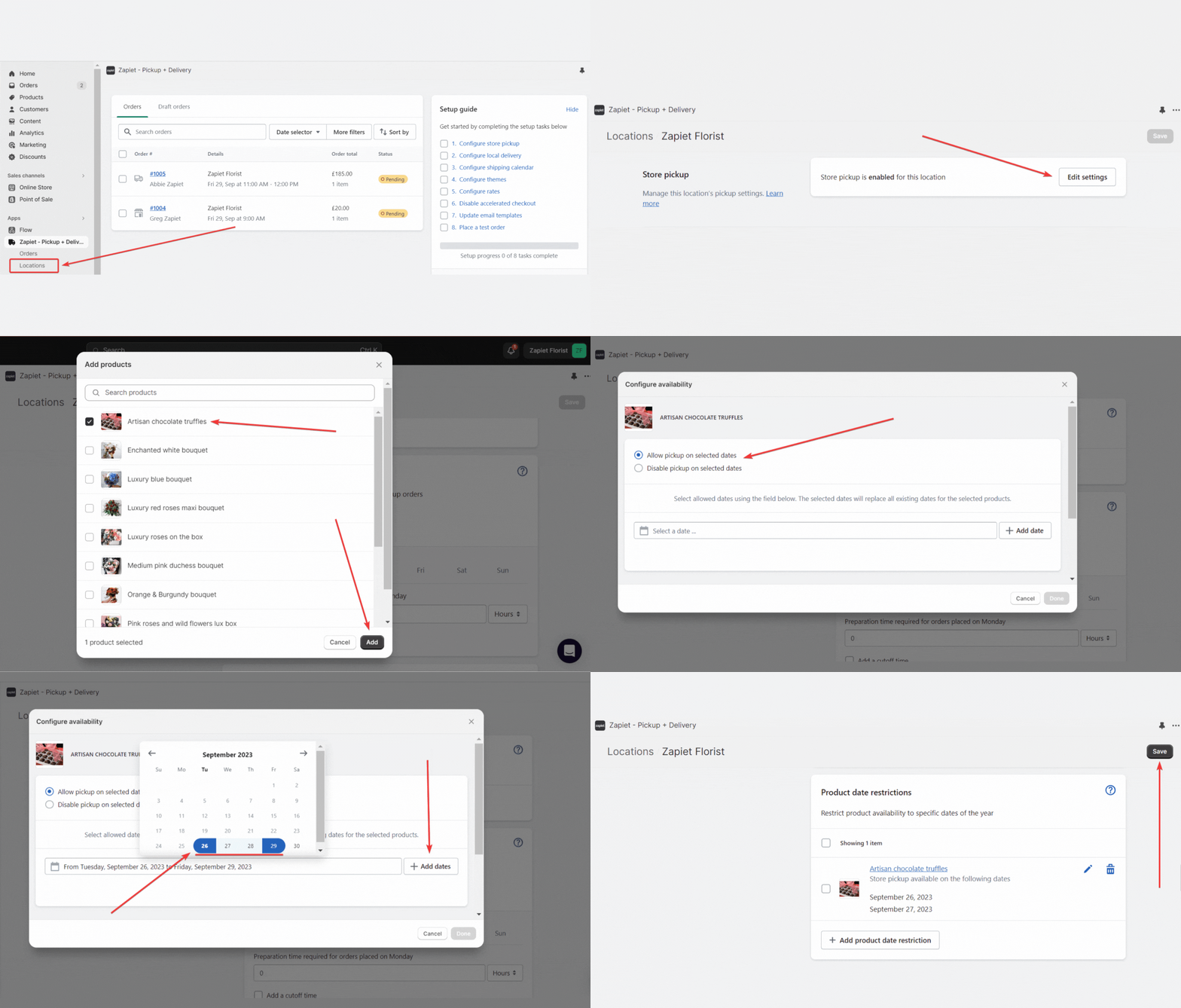
Check out our Help Article for more information.
6. Promote in-store pickup using discount codes
Deliveries are hard. Even more so at the busiest time of the year. We strongly recommend encouraging your customers to pick up their orders. One way you can do this is to offer them a discount such as 10% for picking up.
To add a discount code to Zapiet – Pickup + Delivery, follow the instructions below:
- Open Zapiet – Pickup + Delivery.
- Click Settings.
- Choose Store Pickup.
- Find the Discount section and enter the discount code you created in Shopify.
- This field is case-sensitive –“PickUp” is not the same as “pickup”. You can only add one discount code at a time.
- Click Save.
Your pickup discount code should be automatically applied at checkout.
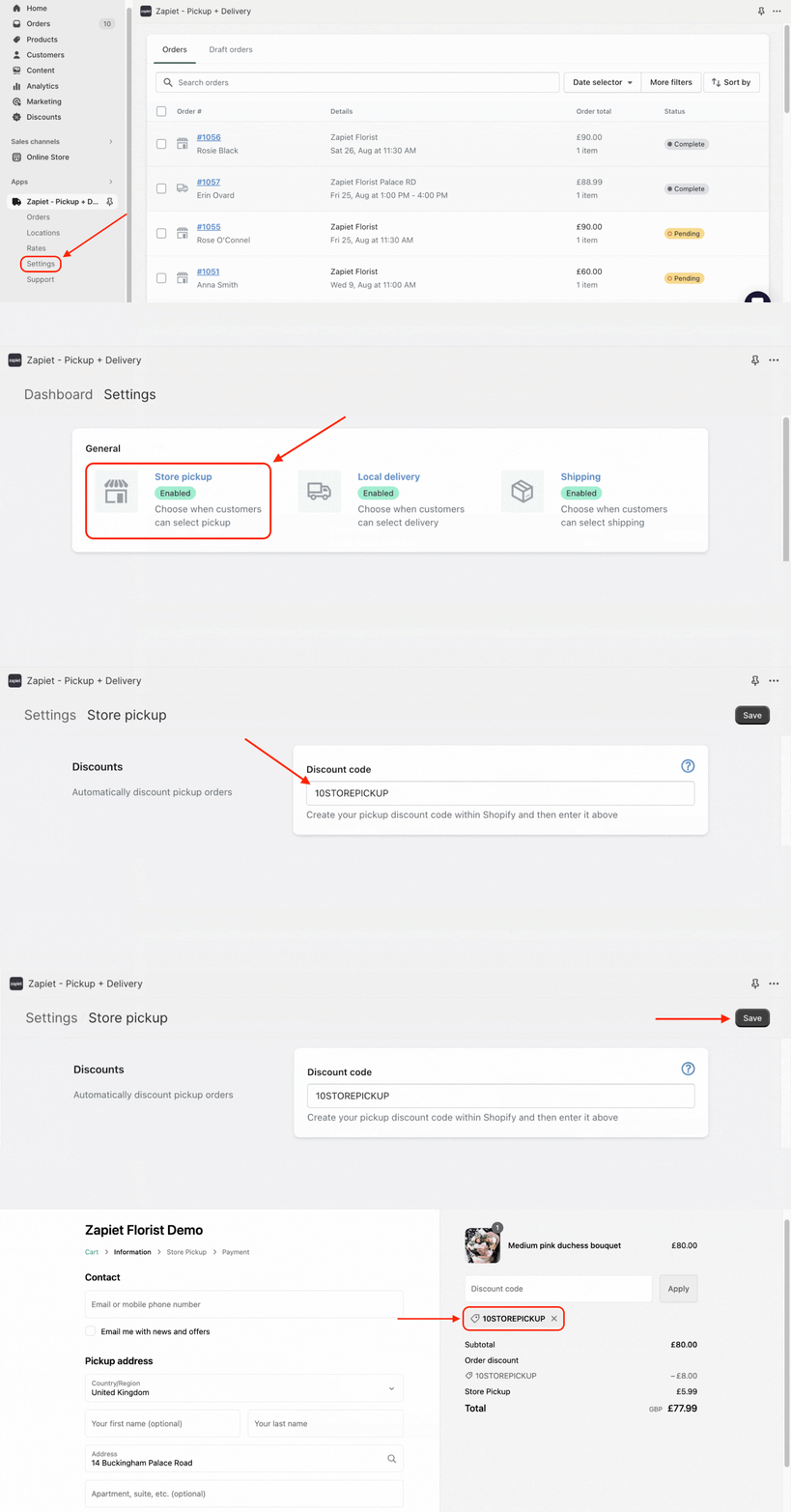
Read the full article to add the discount code hassle-free.
If you have a high-capacity fleet of drivers and want to provide your customers with all available delivery methods, we’ve added a discount code feature to Local Delivery and Shipping to make your customers even happier during BFCM. You can read more about how to set them up in our articles – Delivery discount code and Shipping discount code.
7. Create production reports to prepare orders on time
To precisely handle all the orders during BFCM, we recommend using our Production reports feature.
It allows you to export all your orders with detailed information to a CSV file to have on hand the list of items needed to prepare for a given date and location.
For example, if you have a cake store, you can create production reports every morning to see the list of cakes and cupcakes you need to prepare for the day.
Create a production report with the following steps:
- Enter Zapiet – Pickup + Delivery.
- Open the Orders tab.
- Select the orders you'd like to create a production report for.
- Click Export to CSV, and then Production report.
- In the pop-up, enter your email address, and click Export production report.
- Once you get an email with the download link, click Download report.
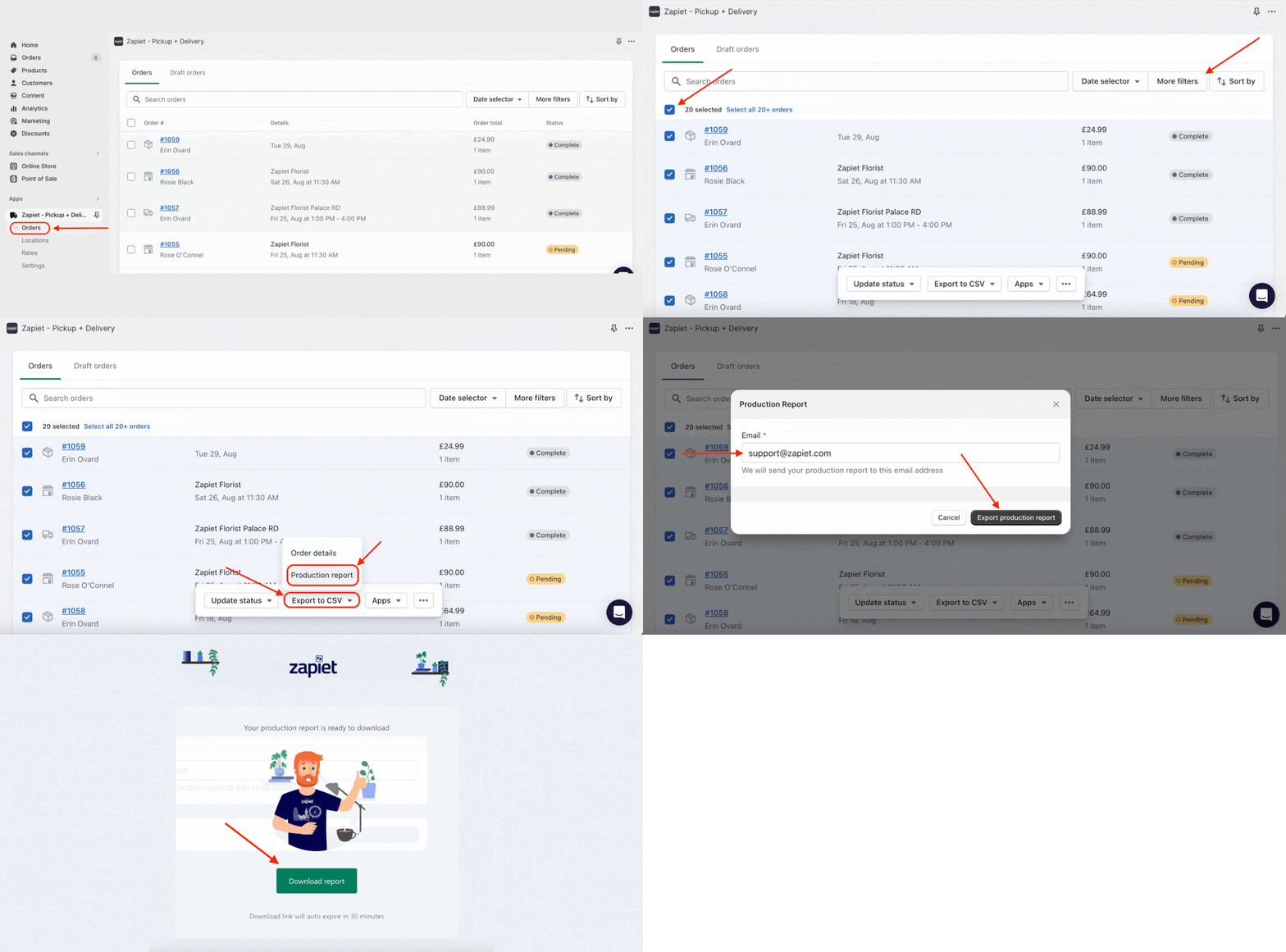
Check the guide in our Help Center.
8. Offer free local delivery
According to Finances Online, 49% of customers stated that free shipping and delivery is the main factor influencing their decisions during Black Friday and Cyber Monday.
With our latest rates feature, merchants can use Zapiet – Pickup + Delivery rates without needing access to Shopify Carrier Service API. It will show your customers only the rates that are related to the checkout method selected in the widget – when Local Delivery is selected, it’ll show local delivery rates.
If you want to make local delivery free for your customers at the time of BFCM, you can easily configure your settings within Zapiet – Pickup + Delivery.
- Open Zapiet – Pickup + Delivery.
- Click the Rates tab
- By default, we set free local delivery for all our merchants. However, if you have changed settings, you can adjust them back to the free delivery option.
- Click Free delivery rate.
- Save your settings.
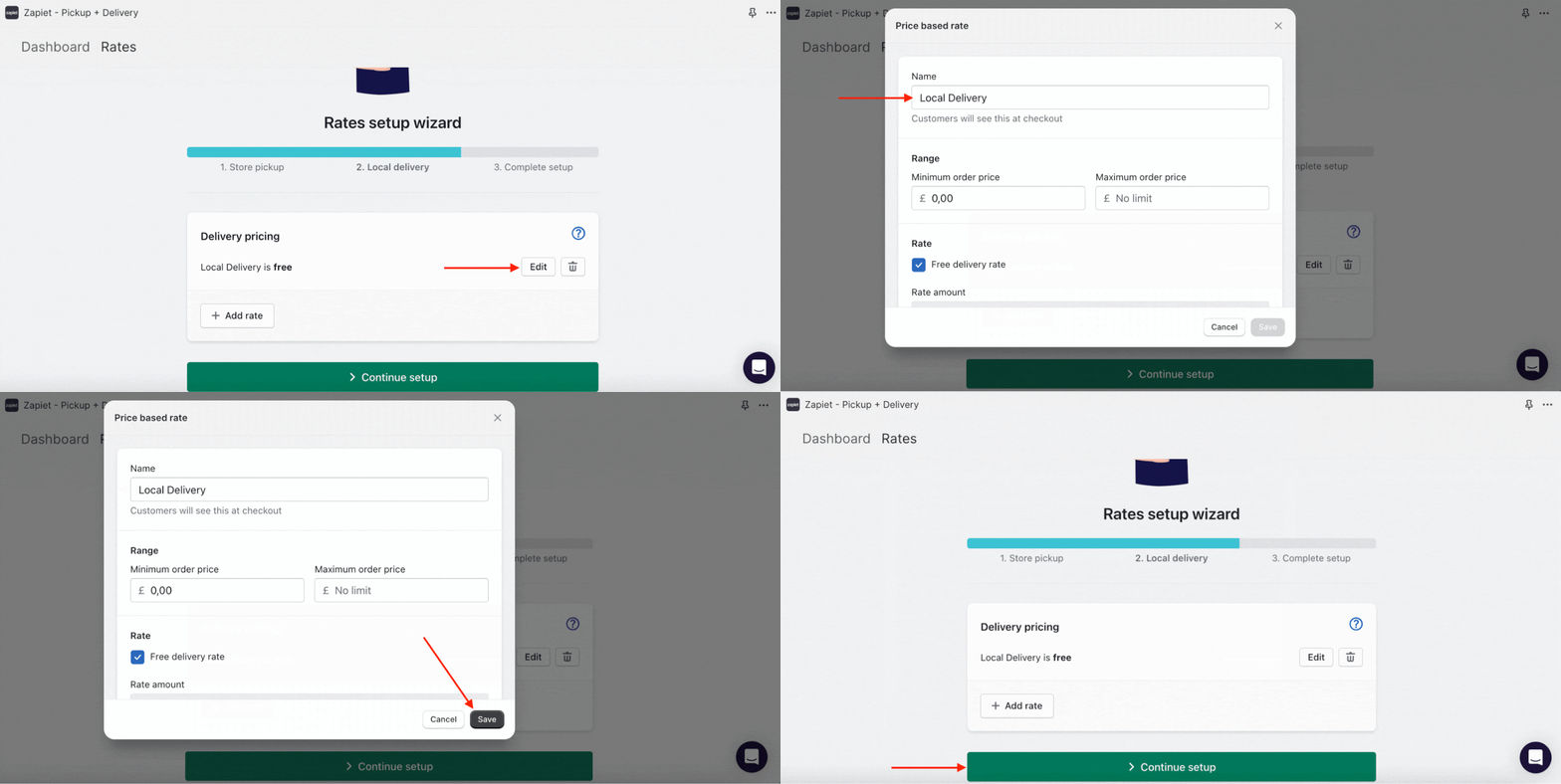
Learn more in our Help Article.
9. Accelerate your purchases with checkout extension
If you are a Shopify Plus store, you can add our widget to the checkout page with our checkout extension widget. It will make customer journeys faster and more intuitive, accelerating the purchase time and reducing bounced carts.
To quickly add our widget to your checkout, follow these steps:
- In the Online Store > Themes tab, click Customize next to the theme you want to edit.
- Click Home page, then Checkout.
- Click Information, then Shipping.
- Click Add app block.
- Click the Checkout widget by Zapiet - Pickup + Delivery to enable our widget.
- You will see our widget at the checkout page.
- Click Save.
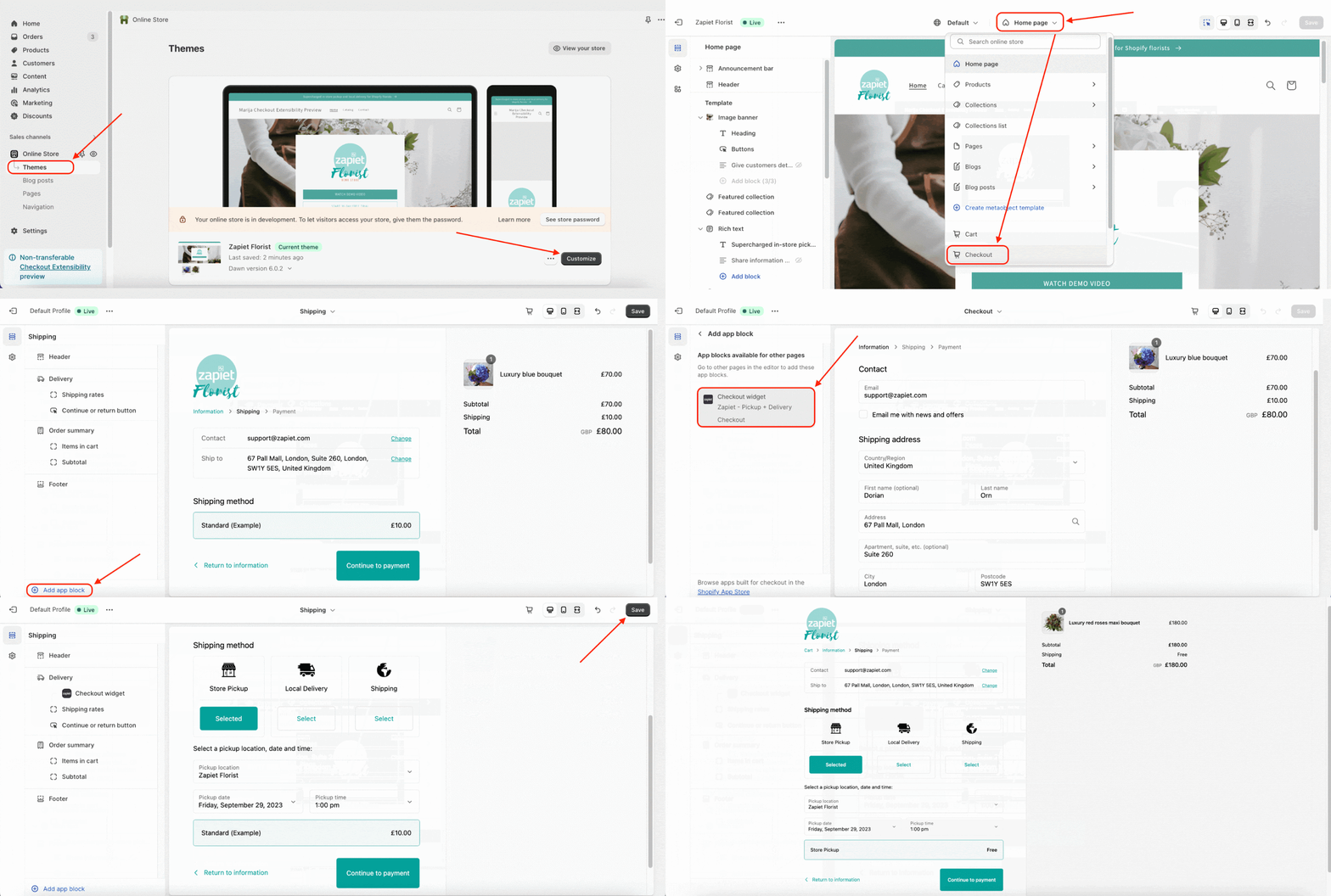
Read more in our Checkout extension article.
If you want to increase your store capacity during the festive season, look in our Help Center for more features.
Bonus tip: Outsource your deliveries
Black Friday & Cyber Monday is all about optimization. According to E-Commerce Training Academy, slow delivery is one of the factors that can negatively affect the retention rate.
To help you optimize the delivery process, we have prepared a list of recommended Last-Mile Delivery services.
Zapiet has been focusing a lot on the partnership during the last year to expand our reach across Europe. We’re happy to introduce our new Partners – Uber Direct France and Stuart which work across multiple European countries.
Now, we have couriers based in the United States, Canada, the United Kingdom, France, Spain, Portugal, Poland and Italy. You can easily filter couriers by the location directly from the app.

Activate one of our last mile delivery integrations to upgrade your delivery operations for Black Friday and Cyber Monday.
United States:
- Skipcart is a white-label delivery fleet providing same-day and on-demand delivery for a variety of industries across the US;
- Rapidus offers fast courier delivery everywhere in California, Colorado, Washington, Texas, and Illinois;
- Roadie delivers goods from your Shopify store and provides the best-in-class shopping experience across the US.
Canada:
- Trexity is a delivery management platform that provides merchants with a wide choice of drivers and operates across major centers: Ottawa, Toronto, Winnipeg and Calgary.
United Kingdom:
- Urb-IT is a sustainable same-day and next-day delivery for businesses in cities across the UK and France;
- Ryde allows you to seamlessly blend internal and outsourced delivery workforces, offering live route mapping and proof of delivery.
- Gophr is a smart last-mile delivery network that connects businesses with customers in cities across the UK.
- Stuart is a tech logistics company that has revolutionized urban delivery.
France:
- Uber Direct offers a courier network in France that will deliver your goods promptly and securely.
- Stuart is a tech logistics company that has revolutionized urban delivery. Along with the UK and France, Stuart also works across Spain, Italy, Poland and Portugal.
For more integrations, check out our integrations page. If you couldn’t find your preferred couriers listed, you can fill out the in-app form and we’ll try to make the integration happen.
BFCM is a great time for merchants to increase revenue and attract new customers. To make the most out of these days, you should start preparing your store in advance. We hope that our tips will help you get ready for the festivities to be “all sold out”.
Zapiet has prepared a video where our partners are happily sharing their BFCM stories to get some inspiration and insights for this year's season! If you come up with more tips & tricks or just interesting stories from BFCM, don’t hesitate to share them on our Instagram and Twitter. We’d love to discover it together!
Share this post
Get the Pickup + Delivery app and streamline your online or physical store
Start selling smarter, install our apps and try for free.
Get the Pickup + Delivery app and streamline your online or physical store
Start selling smarter, install our apps and try for free.